Property performance reports are supposed to make everything clearer, yet many investors find themselves buried in multiple spreadsheets, confused by scattered data and waiting far too long for answers they need right now. Morgan Stanley reports that AI is able to automate over a third of real-estate tasks and drive up to $34 billion in industry-wide efficiencies. Smart investors are no longer waiting for monthly spreadsheets, they’re using AI systems to produce property performance reports instantly.”
Also, when rents shift, occupancy drops or demand changes, slow reporting can turn small issues into expensive problems. That is why more owners and operators are turning to AI. Instead of wrestling with manual reports, AI can gather data instantly, spot patterns humans might miss and create clear, easy to understand summaries in seconds. This guide shows how to use AI to generate property performance reports that are faster, smarter and far more useful for making confident decisions.
Related: How To Calculate the Value of a Multifamily Property Easily
Why AI Matters for Property Performance Reporting
AI is changing the way investors and property managers understand their buildings because it can handle tasks that normally take hours in just a few seconds. Traditional reports require people to gather data from different systems, check for mistakes and try to make sense of patterns on their own. AI removes most of that work.
1. AI is Fast
Investors can use AI to scan thousands of data points instantly. Instead of waiting hours or days for reports, investors can see what is happening inside a property right away.
2. AI is Accurate
Manual reports often include errors, missing information or outdated numbers. AI systems can be used to read data directly from the source, which reduces mistakes and gives a clearer picture of performance.
3. AI Handles Large Amounts of Data Easily
A property produces a lot of information each day. This includes rent changes, renewals, move-ins, move-outs, demand trends and more. AI systems can be used to analyze all of this at once, which helps uncover patterns that might be impossible to spot manually.
4. AI Automates the Hard Work
Tasks like deduping data, combining reports, calculating trends and building charts can be done automatically. This saves time and lets property teams focus on improving operations rather than managing spreadsheets.
5. AI Makes Insights Easier to Understand
Instead of showing raw numbers, AI explains what the data means. It highlights important changes, points out risks and offers helpful summaries that anyone can understand.
AI makes reporting faster, smarter and far more reliable, which is why investors are adopting it as a key part of their real estate strategy.
Related: The Best AI Tools for Commercial Real Estate
Key Data Points AI Uses to Build Reliable Property Performance Reports

AI can instantly review data points coming from everyday operations inside a property and help understand how well the building is performing. AI can spot trends, highlight risks and explain what is driving changes in revenue or occupancy.
1. Occupancy Trends
Investors can use AI to look at how occupied the property is over time. This includes current and past occupancy as well as projected availability. By studying these patterns, AI can show whether demand is rising or falling and warn investors when a property might struggle to hit its goals.
2. Rent Roll Data
Rent roll information tells AI how each lease was achieved, how much each unit is rented for and when leases expire. This helps AI track total revenue, identify units priced too low or too high and understand whether upcoming vacancies may affect income.
3. Leasing Performance
AI can be used to review leasing activity to see how well the property is converting leads into signed leases. It analyzes tours, applications, approvals and move-ins. Strong leasing signals healthy demand, while weak leasing may point to pricing issues or competition.
4. Operating Expenses
Expenses like maintenance, management fees, utilities, taxes and repairs all affect how much profit a property actually makes. Investors can use AI to see whether costs are rising too quickly or if certain areas need closer attention.
5. Market Comps
Investors can use AI to compare the property to similar buildings nearby. This includes rents, amenities, occupancy levels and any specials competitors are offering. Comps help investors understand whether their property is performing above or below the market.
6. Revenue Changes
AI can be used to study month to month and year to year changes in revenue. It looks at factors like rent increases, renewals, move-outs and pricing adjustments. This helps investors see what is driving growth and where income may be slipping.
7. Demand and Traffic Trends
By analyzing website visits, inquiries, tours and applications, AI can show how interested renters are in the property. When demand drops, AI can alert investors early so they can adjust pricing or marketing before revenue is affected.
8. Unit-Level Insights
Some AI tools go deeper and look at performance for each unit. This includes days vacant, amenity impacts and whether certain unit types rent faster or slower. These details help investors make smarter pricing and renovation decisions.
When AI puts all of these data points together, it creates reports that are not only accurate but also easy to understand. Investors can quickly see what is working, what is not and what actions might improve performance going forward.
Top Pick: The Best AI Tools for Real Estate Investors
Step by Step: How to Use AI to Generate a Property Performance Report Using Rentana
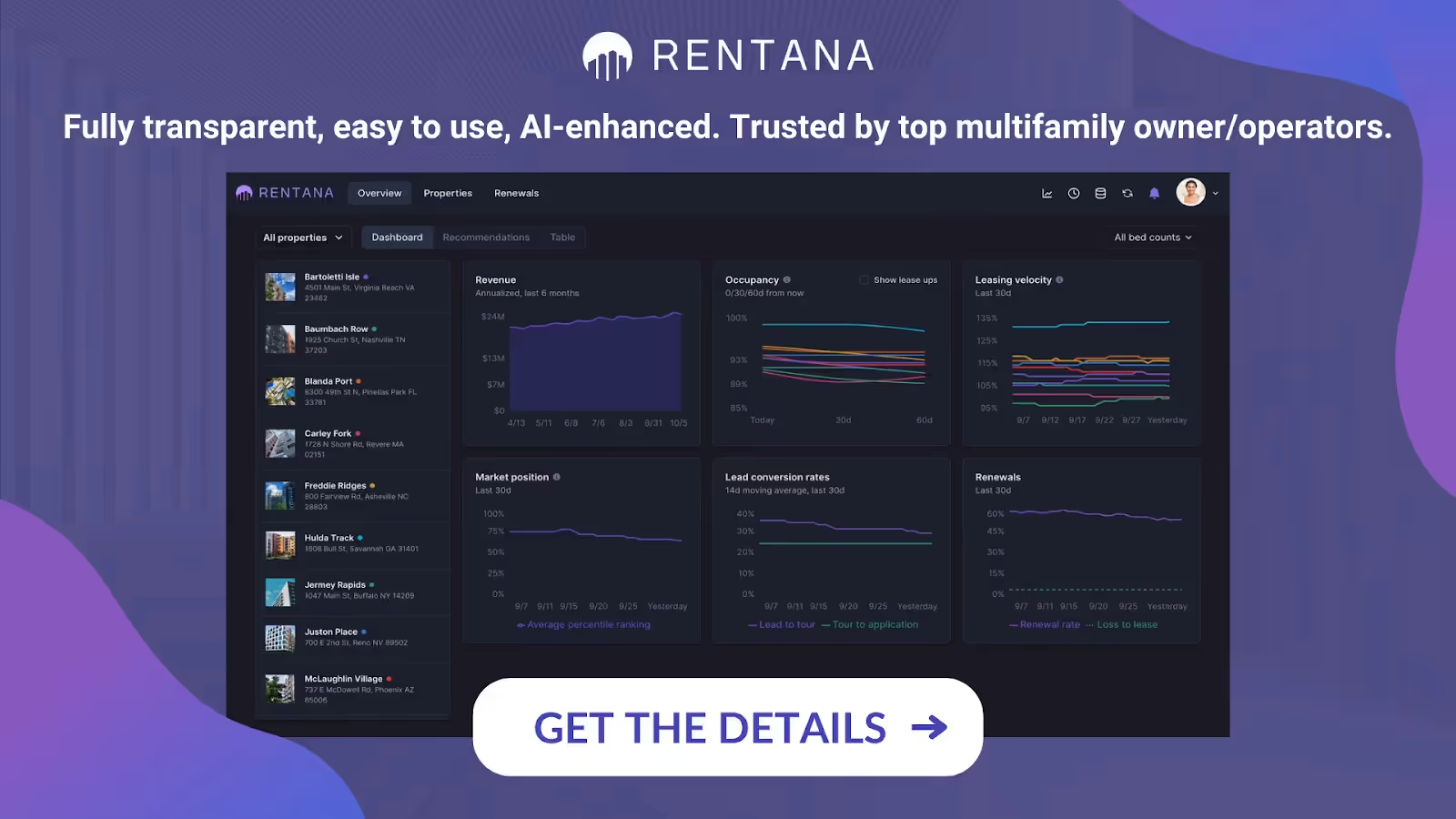
Rentana uses AI to turn raw public data into clear guidance for investors. Instead of building reports from scratch, you walk through a few views and the platform surfaces what matters: where you are on track, what is off, and what you should do next.
1. Start With the Portfolio Health View (Red–Yellow–Green Snapshot)
What you see:
Rentana opens with a “portfolio of portfolios” view, a 10,000-foot dashboard that groups your portfolios by client, partner, geography, asset type or any structure you choose. Each group is labeled with simple red, yellow, green status markers so you can see overall health at a glance.
How AI helps:
- Highlights which portfolios are off track on core metrics like occupancy or predicted occupancy.
- Lets you instantly see where your attention is needed instead of manually digging through each asset.
Sample scenario: Monthly performance snapshot:
At the start of the month, you open Rentana and see that two portfolios are marked red for predicted occupancy while others are green. That view alone acts as a high-level performance report, telling you exactly where to focus your next steps and which assets are performing well enough to leave alone.
2. Drill Into a Portfolio for a Focused Performance Report
What you see:
With one click, you move from “all portfolios” into a single portfolio and see all the properties inside it, again flagged red, yellow or green.
How AI helps:
- Surfaces which properties are off track relative to your goals.
- Summarizes performance for each property in a way that feels like a condensed portfolio report.
Sample Scenario: Owner update email:
You are preparing a monthly update for an equity partner. You open the portfolio view, take note of which assets are red or yellow, and use that as your outline:
- Green assets: “Stable, performing as expected.”
- Yellow/red assets: “Here’s where we’re adjusting pricing and marketing based on Rentana’s signals.”
Related: Top Real Estate Market Analysis Tools
3. Use Property-Level Demand and Occupancy Insights
What you see:
Click one more time and you land on an individual property view. Here, Rentana shows
- Demand trends over time
- Conversion over different time frames
- Supply and availability forecasts into the future
- Occupancy trend lines
- Lease trade-outs (how renewals or new leases compare to previous rents)
- Breakdown by bedroom type or unit type
How AI helps:
- Detects spikes or dips in demand and highlights them visually.
- Forecasts availability and shows how occupancy is likely to evolve.
- Gives you a “mini report” for that property’s leasing and occupancy performance without manual analysis.
Sample scenario: Demand insights:
You notice occupancy is drifting downward for a Class A asset. In Rentana, you see:
- Demand has dropped over the last 30 days.
- Conversion from leads to leases has weakened on 2-bedroom units.
- Future availability is forecasted to rise.
This becomes a clear demand-driven performance story that you can share with your team and investors: “Leasing is softening on 2BRs; we are responding with pricing and marketing adjustments.”
4. Apply AI-Powered Pricing Recommendations
What you see:
On the pricing view, Rentana groups units (for example, all 2-bedrooms) and shows AI-driven pricing recommendations, such as “+3% price increase” for that group.
Each recommendation is paired with:
- An AI-generated explanation of how Rentana reached that conclusion
- A set of graphs and KPIs showing changes in demand, occupancy, comp trends and other relevant variables
You can accept the recommendation, override it or adjust pricing manually.
How AI helps:
- Automatically reads demand, occupancy, comp data and performance metrics to propose new prices.
- Explains the “why” behind the recommendation so you are not blindly trusting a black box.
- Lets you apply changes with one click, pushing updates back into your PMS.
This turns a complex pricing decision into a clear, AI-backed storyline for investors.
Read Also: How to do a Comparative Market Analysis in Real Estate
5. Analyze Market Comps With Full Transparency
What you see:
In the comps section, Rentana shows:
- Exactly which competitor properties you selected to track
- A map view with Google Street View for visual context
- A side-by-side table with floor plan details, square-foot normalized rents, amenities, fees and specials
You can also download the data in CSV format or connect it directly to your BI stack via API.
How AI helps:
- Normalizes comp data at the square-foot level.
- Organizes and presents comps in a way that makes pricing comparisons easy.
- Helps you see whether your property is under- or over-priced relative to the market.
Sample scenario – Market section of a report:
You include a “Market Position” section in your performance report:
- “Our average 1BR rent is 2–3% below normalized comp average.”
- “Competitors are offering move-in specials; Rentana’s comps module confirms these offers and their impact.”
This makes your report feel data-rich and market-aware without extra manual research.
6. Build Custom Performance Reports With the Metrics Browser
What you see:
Rentana’s metrics browser is a flexible reporting tool. You can:
- Pick any property or group of properties
- Choose any metric tracked in Rentana (demand, conversion, days vacant, etc.)
- View those metrics over time and across assets
- Create and share custom reports with your team
How AI helps:
- Centralizes all relevant metrics so you do not hunt across multiple systems.
- Makes it easy to spot patterns and build exactly the performance view you need.
- Supports portfolio-level comparison for owners with multiple assets.
Sample scenario: Portfolio performance report:
You build a quarterly report that compares:
- Occupancy and demand trends across all assets
- Days vacant by property
- Conversion and pricing actions over the quarter
You export or share the metrics browser view and now have a polished, AI-powered performance report for your investors.
Taken together, these features let you move from a high-level red–yellow–green snapshot, down through portfolio and property performance, to specific pricing and comp insights. Rentana’s AI does the heavy lifting in the background while you focus on what matters: telling a clear story about performance and deciding what to do next.
Related: The Best AI Tool for Rental Market Analysis by Zip Code
Conclusion on Property Performance Reports
Generating clear, accurate property performance reports no longer has to be a slow or stressful process. With AI, investors can see what is happening across their portfolios in seconds, understand the story behind occupancy and demand changes and make smarter decisions based on real data instead of guesswork.
Rentana brings all of this together in one platform by turning raw information into easy to understand insights, pricing guidance and performance snapshots that help investors stay ahead.
With tools that highlight what needs attention and show exactly why it matters, Rentana gives investors the confidence to act quickly and manage their properties with clarity and precision.